 ShopSmith
Prepare better listings, faster.
A local-first desktop app for Etsy digital product sellers. Generate listing photos, upscale source assets, run preflight checks, and package everything into ready-to-publish upload kits.
What ShopSmith Does
ShopSmith helps Etsy sellers prepare digital product listings — from generating listing photos and upscaling source assets to running preflight checks and packaging everything into ready-to-publish upload kits.
Source Management
Upload and organize your digital product source files. ShopSmith tracks versions and extracts product insights for listing preparation.
Listing Photos
Generate full listing photo sets — hero images and staged mockups — ready for your Etsy shop.
Upscaling & Preflight
Upscale source assets for crisp listing images. Preflight checks warn about resolution, DPI, file sizes, and Etsy format and count constraints before you publish.
AI Content
Generate optimized titles, descriptions, and tags using AI. Review and approve everything before it goes anywhere.
Upload Kits
Download organized ZIP bundles with deterministic file naming, sequenced images, and Etsy-ready size and format constraints.
Guided Publish
Step-by-step copy-paste workflow with keyboard shortcuts, progress tracking, and an approvals gate before marking products ready to publish.
See It in Action
ShopSmith prepares everything you need before you publish. Review generated listing photos, download upload kits, and follow the guided publish workflow — all from your desktop, all under your control.
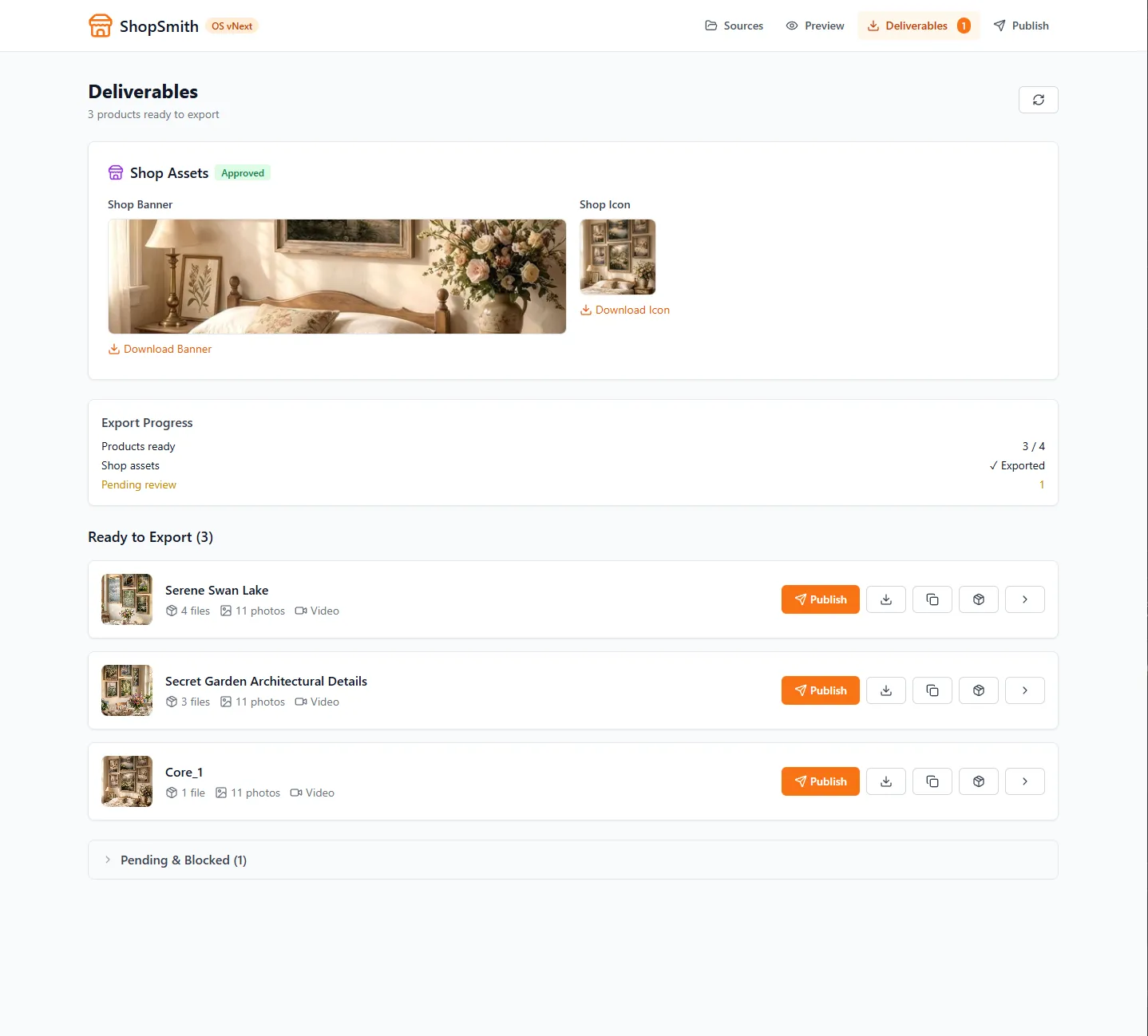
How It Works
ShopSmith is a local-first desktop application. All data — your source files, generated content, and product database — stays on your computer. Nothing is uploaded to our servers.
The workflow is straightforward:
- Drop source files into ShopSmith
- ShopSmith generates listing content and listing assets (titles, tags, hero images, staged mockups)
- Review and approve generated content
- Download upload kits or use Guided Publish to list on Etsy
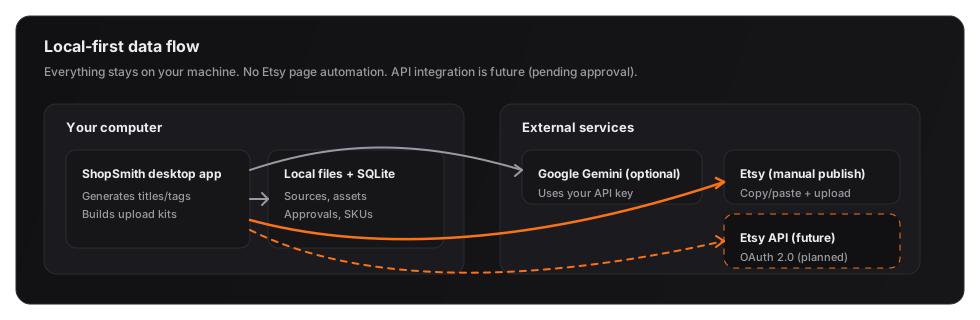
ShopSmith does not scrape, crawl, or automate Etsy pages. We prepare listing content that you manually publish through Etsy's native interface. All interaction with Etsy happens through your browser, under your control.
Questions? Reach us at support@shop-smith.com.
API Integration
API integration is planned — awaiting Etsy API approval. When approved, ShopSmith will use OAuth 2.0 with least-privilege scopes to streamline the publishing process. Until then, all Etsy interaction is manual via the Guided Publish workflow.
- OAuth 2.0 + least-privilege scopes (planned)
- No screen scraping / no automation
- We will follow Etsy API caching requirements (planned)
- We will not request buyer email / buyer data unless strictly necessary (planned)
- We will not ask users to create their own Etsy API key
Legal
The term "Etsy" is a trademark of Etsy, Inc. This application uses the Etsy API but is not endorsed or certified by Etsy, Inc.